this-should-be-the-last-article-you-must-read-on-openclawmd
9,315 chars · 2,329 tokensUTF-8 · LF
# This should be the last article you must read on OpenClaw
---

The two core pillars
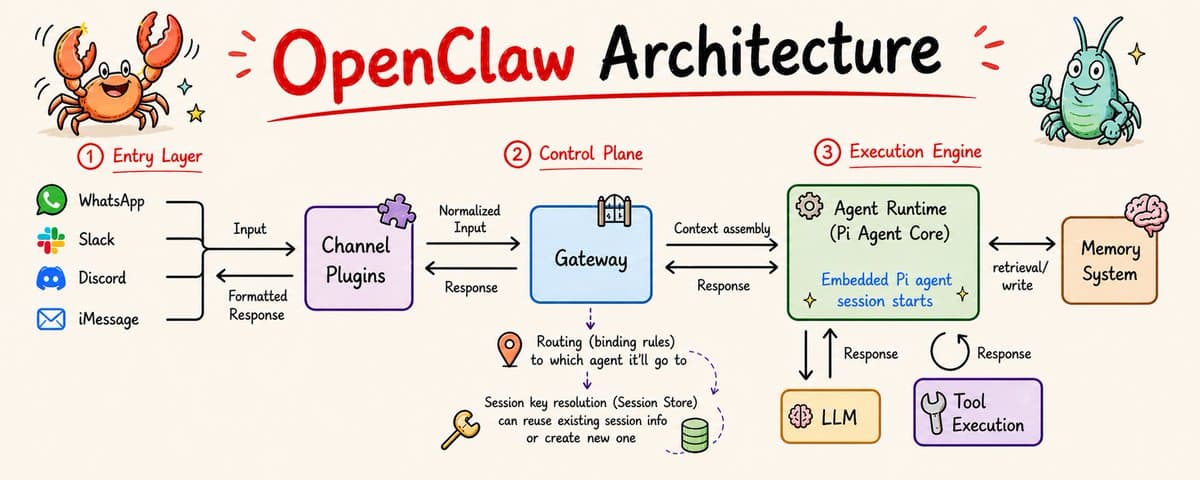
At a high level, OpenClaw is built around two core layers.
Gateway - This acts as the communication and control layer. It receives input from different sources, decides which agent should handle it, resolves sessions, and orchestrates the entire flow.
Agent Runtime - This is the execution layer powered by Pi. This is where the actual work happens. The model runs, tools are executed, and tasks are completed step by step.
Once you understand how these two interact, the rest of the system becomes much easier to follow.
How a message flows through OpenClaw
Let’s walk through what happens when a message enters the system.
1. Channel Plugin
Every interaction with OpenClaw begins through a channel plugin.
Channel plugins connect OpenClaw to external platforms like Slack, WhatsApp, Discord, iMessage etc. Each platform has its own plugin, and within each plugin there are adapters responsible for handling specific responsibilities such as account configuration, normalizing incoming messages into a standard format, and formatting outgoing responses.
By the time a message leaves this layer, it is transformed into a normalized format that the rest of the system can process.
2. Gateway routing and agent selection
Once the message reaches the Gateway, the gateway evaluates routing bindings (rules) to determine which agent should handle it.
Each agent operates within its own isolated setup. This includes its own workspace, state directory, and session store. This separation is important because it allows different agents to operate independently while still being orchestrated by the same system.
The Gateway is effectively making a decision about where this request should go and how it should be handled.
The Gateway is not only deciding where the request should go, it is also responsible for how execution is coordinated. If a message arrives while an agent run is already active for the same session, it is not processed immediately. Instead, it is queued and handled once the current run completes. This ensures that there are no overlapping executions on the same session and that the context remains consistent across turns.
3. Session resolution and persistence
After selecting the agent, the Gateway either loads an existing session or creates a new one.
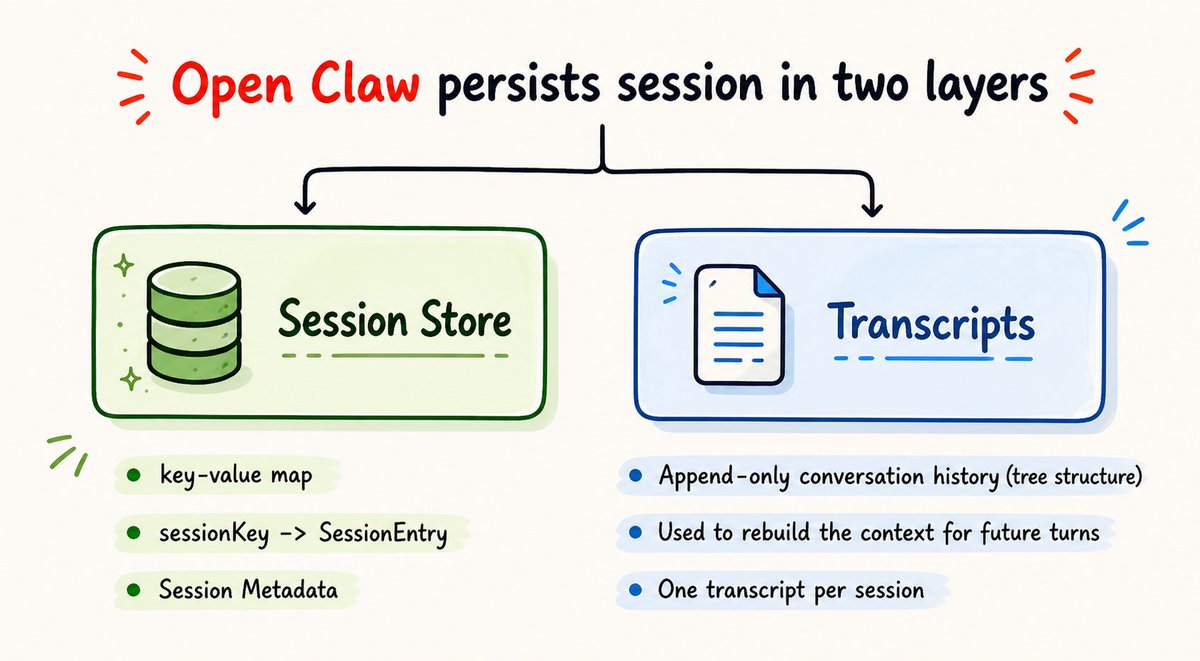
Before knowing how Gateway decides this, it's important to understand how OpenClaw persists session data. It persists session in two layers:
Session store - This is a lightweight metadata layer implemented as a key-value map. Each sessionKey maps to a SessionEntry that contains details like the current session ID, updatedAt, and other session-level information.
Transcripts - This is where the actual conversation history is stored. It is an append-only log where each entry is linked to previous ones, forming a tree-like structure. This history is used to rebuild context whenever a new message comes in.
Now, when a new message arrives, the Gateway derives a sessionKey using details from the incoming request. The decision as to whether to continue with the existing session or start a new one is based on the updatedAt timestamp within the sessionKey along with the reset policies configured for the agent. These policies define conditions such as daily resets at a fixed time, idle timeouts after a period of inactivity, or manual resets triggered through commands.
If the session is considered stale based on these conditions, a new session is created. Otherwise, the existing session is reused with its latest context.
4. System prompt construction
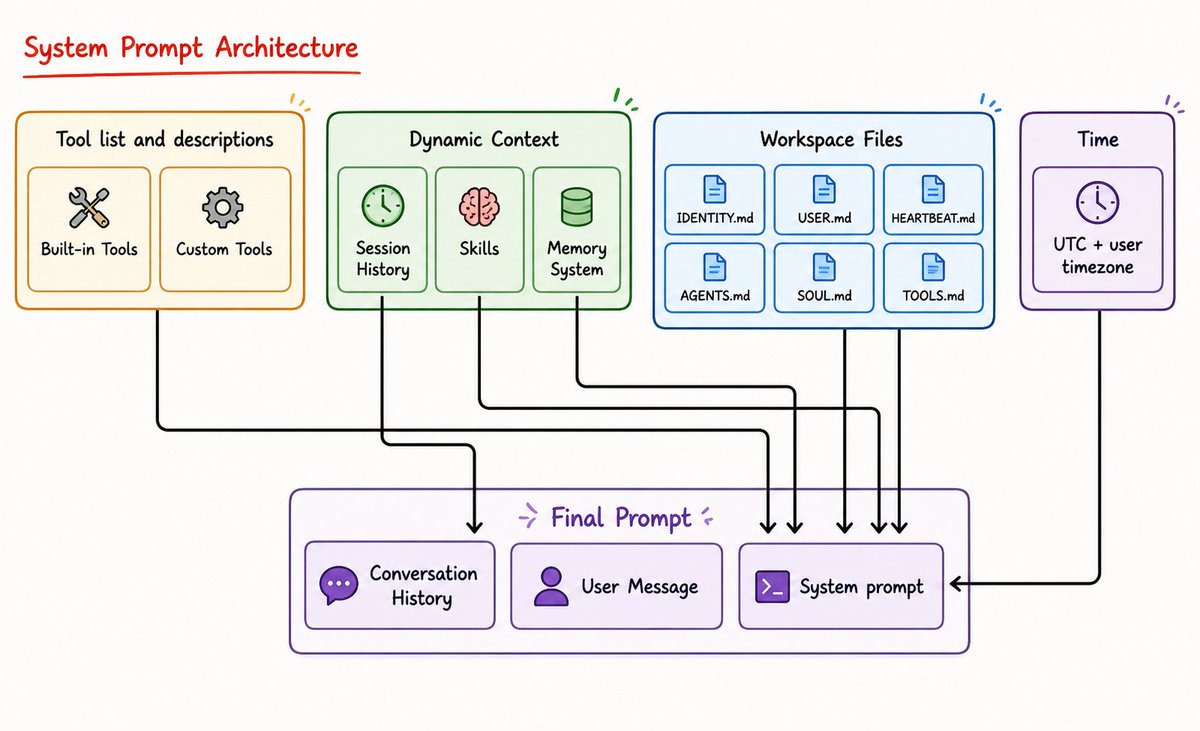
Once the session is resolved, OpenClaw builds the system prompt. This is where multiple components are combined into a single prompt that is sent to the model.
Note: OpenClaw constructs a custom system prompt for every agent run.
The final prompt sent to the model is a combination of multiple components:
Tool list and descriptions – Defines all the available built-in and custom tools along with how the agent can use them.
Session history – Provides past conversation context so the model can continue the interaction coherently.
Skills – Injects reusable capabilities or behaviors that the agent can apply when relevant (only metadata is injected at this point)
Memory system – Brings in stored knowledge or past learnings that extend beyond the current session. OpenClaw stores this memory as plain Markdown files inside the agent’s workspace. Long-term memory is maintained in a memory.md file, while running context and daily notes are stored in timestamped files under a memory directory. This allows the agent to persist and reuse knowledge across sessions.
Workspace files – Includes structured files like IDENTITY.md, USER.md, AGENTS.md, SOUL.md etc that define agent behavior and environment context.
Time – Adds temporal context such as current UTC time and user timezone for time-aware reasoning.
User message – The current input from the user that the agent needs to respond to.
All of these are combined to form the final prompt, which directly shapes how the model interprets the request and executes the task. This step is critical because the behaviour of the agent is heavily influenced by how this prompt is constructed.
5. Agent runtime and execution loop
Once the system prompt is constructed, execution moves into a Pi session inside the Agent Runtime. This session acts as the execution context for the task and can either be newly created or reused depending on session state.
The assembled prompt is passed into this session to begin execution.
From here, the Pi agent core runs an agent loop. In each step, the model processes the current context, decides the next action, and either generates a response or triggers a tool call. The result of that action is then appended back into the session context, and the loop continues.
As part of this loop, the agent can also make use of skills and memory. In parallel, the agent can retrieve relevant information from memory to guide its decisions, and write back new information so that useful knowledge persists beyond the current session.
At the same time, the runtime emits structured events for every step, which allows the system to stream intermediate outputs and maintain visibility into what the agent is doing.
This process continues until the task is completed.
6. What happens after execution
Once the response is generated, the control returns to the Gateway.
Along with the final response, the Agent Runtime also produces the updated session state. This includes the session metadata and the latest transcript entries such as the assistant response, tool calls, and tool outputs.
The Gateway then persists this information. The session store is updated with the latest metadata, and the transcripts are appended with the new conversation events. This ensures that the session can continue seamlessly in future interactions.
Finally, the response is passed back to the channel plugin, which formats it according to the destination platform and delivers it back to the original source.
Ways to trigger events in OpenClaw
One of the reasons OpenClaw feels responsive and always active is because agents are not only triggered by user messages. There are multiple ways the system can initiate execution, which allows it to react to events, run checks in the background, and automate workflows.
Messaging channels - There are the most direct way to trigger an agent. Inputs coming from platforms like Slack, WhatsApp, Discord, or the web interface are routed through channel plugins and handled immediately.
Heartbeat - Heartbeat is a periodic trigger where the system invokes the agent at a fixed interval, typically every 30 minutes by default, to check the current state and decide if any action is required. This allows OpenClaw to monitor things continuously without waiting for user input.
Cron jobs - These are scheduled triggers which run at specific times based on a defined schedule, such as triggering an agent every morning at a particular hour to perform a routine task.
Webhooks - These are external triggers, events from outside systems that can invoke the agent. For example, receiving a payment event from Stripe can trigger a workflow inside OpenClaw to process that information and update records.
Hooks - Hooks are internal triggers that are generated within the system itself based on state changes. For example, once a task is completed, a hook can trigger another action like sending a notification.
There are also programmatic triggers such as CLI operations, web interface actions, or even one agent invoking another. These allow deeper automation and coordination between different parts of the system.
Together, these triggering mechanisms allow OpenClaw to operate beyond simple request-response interactions and behave like a continuously running system that can respond, monitor, and act on its own.

ref · E4z23WETxmdbot.com/c/E4z23WET